
Quick Baidu Netdisk Offline Downloads
Overview
The Baidu Netdisk Helper extension is designed to streamline the process of downloading files from web pages directly into Baidu Netdisk through offline download functionality. It addresses the common frustration of slow resource downloads by enabling users to quickly select and queue multiple links for offline processing. This tool is particularly useful for individuals who frequently encounter downloadable content across various websites but prefer to manage all their downloads through a centralized cloud storage system.
Target users include students, researchers, content curators, and digital archivists who regularly collect files from public web sources. The extension operates entirely within the browser environment, making it accessible without installing additional desktop software. It integrates seamlessly with Google Chrome and is compatible with Windows, Mac, and Linux operating systems. The developer, guyanyijiu, has provided full source code on GitHub, promoting transparency and community-driven improvements.
Real-world usage scenarios include downloading research papers, course materials, software packages, or media files from educational or open-access websites. By automating the tedious task of manual copying and pasting, the extension reduces time spent on repetitive actions and minimizes the risk of errors during link handling.
Key Features & Capabilities
- One-Click Right-Click Download – Users can right-click on any clickable link on a webpage to instantly add it to Baidu Netdisk’s offline download queue. This eliminates the need to copy and paste URLs manually.
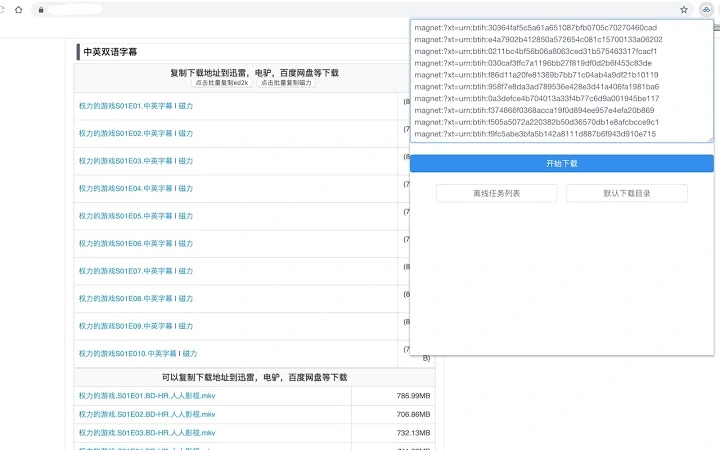
- Multi-Link Selection Support – By selecting multiple links with the mouse (like selecting text), users can extract and queue several links at once. The extension automatically detects and displays them in a popup interface for easy selection.
- Customizable Download Folders – When initiating a download, users can browse and choose the target folder within Baidu Netdisk. A default folder can also be set for faster access during future downloads.
- Direct Link Paste Functionality – Users can paste any URL directly into the extension’s interface to start an offline download without navigating to the source page.
- Automatic Token Handling – The extension uses the user’s active login session (token) from Baidu Netdisk to authenticate requests, ensuring no password is ever accessed or stored.
- Verification Prompt Integration – When the daily limit for offline downloads is reached (typically 10 per day), the extension automatically displays a captcha input field to complete the request.
These features collectively enhance workflow efficiency, especially when dealing with pages containing numerous download links. For example, a student compiling lecture materials from multiple sources can select all relevant links in one go and queue them for download without leaving the browser.
User Interface, Workflow & Performance
The extension’s interface is minimal and focused on usability. After installation, it appears as a small icon in the browser toolbar. Clicking the icon opens a compact popup window that displays extracted links, allows folder selection, and provides a simple form for pasting URLs. The UI design emphasizes clarity and speed, avoiding clutter while maintaining full functionality.
Navigation is intuitive: users either right-click on a link or select multiple links and click the extension icon. The workflow is consistent across all supported platforms. The developer did not specify resource usage details, so performance observations are based on general browser extension behavior patterns. In typical use, the extension responds instantly to user actions and does not noticeably impact browser responsiveness.
Stability is maintained through reliance on the browser’s built-in security model and Baidu Netdisk’s official API. Since the extension does not store credentials and operates only during active sessions, it poses minimal risk to account security. However, compatibility may be affected by future updates to Baidu Netdisk’s interface or authentication system.
Compatibility & System Requirements
The Baidu Netdisk Helper extension is compatible with Windows, Mac, and Linux operating systems. It is designed for use with Google Chrome, the primary browser platform for which it is developed. The installation size is 1.5 MB, indicating a lightweight footprint that does not impose significant storage demands.
Exact system requirements were not listed. However, since it runs as a browser extension, it depends on the host browser’s capabilities and the user’s internet connection speed. The developer did not provide additional system requirements beyond the OS and browser compatibility. Users should ensure their Chrome browser is up to date to maintain optimal performance.
Pros and Cons
Pros
- Efficiently handles bulk downloads with multi-link selection
- Eliminates manual copying and pasting of URLs
- Supports customizable download folders for better organization
- Open-source with transparent code on GitHub
- Secure authentication via browser session token, no password handling
- Simple, fast interface with minimal user friction
Cons
- May become incompatible after Baidu Netdisk interface updates
- Requires captcha input when daily download limit is reached
- Dependent on Google Chrome browser only
- No built-in download progress tracking or history view
- Limited to Baidu Netdisk as the target storage service
FAQ Section
Is the extension safe to use?
The extension uses the user’s active login session (token) to interact with Baidu Netdisk and does not access or store passwords. It operates within the browser’s security model and does not transmit sensitive data.
Can I use this on browsers other than Chrome?
Currently, the extension is designed exclusively for Google Chrome. No official support exists for other browsers such as Firefox, Edge, or Safari.
What happens if I exceed the daily download limit?
When the daily limit of 10 offline downloads is reached, the extension will automatically prompt the user to enter a captcha to proceed with the request.
Is the source code publicly available?
Yes, the full source code is hosted on GitHub at https://github.com/guyanyijiu/baidu-online-disk-helper, allowing users to review, audit, and contribute to the project.
Does the extension work offline?
No, the extension requires an active internet connection and a logged-in Baidu Netdisk session to function. It cannot operate without access to the Baidu Netdisk servers.
Final Thoughts
The Baidu Netdisk Helper extension delivers a focused, efficient solution for users who rely on Baidu Netdisk for file storage and frequently download content from the web. Its ability to process multiple links at once, combined with secure token-based authentication, makes it a valuable tool for productivity-focused individuals. While limited to Chrome and dependent on Baidu Netdisk’s infrastructure, its open-source nature and straightforward design set it apart from many closed alternatives.
For anyone managing large volumes of web-based downloads and seeking a faster, more organized workflow, this extension offers a practical advantage. It reduces manual effort and enhances control over where files are stored.
Download Baidu Netdisk Helper now







